Webkeys: hotel room keys that open in the browser One link.
Welcome in.

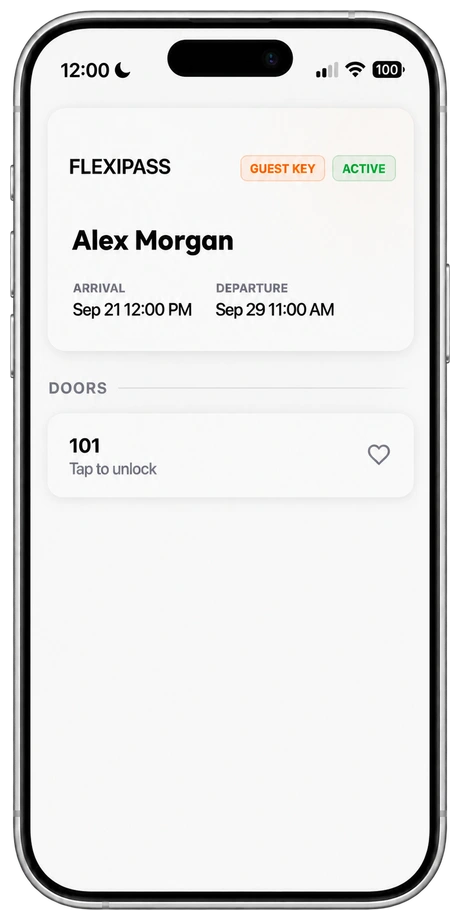
FLEXIPASS Webkeys are digital hotel room keys that open in a smartphone browser. Send a secure link through guest messaging; guests use it with a supported online lock, without downloading a separate key app.

Requires compatible online locks and connectivity.

FLEXIPASS Webkeys on a phone
Room access in the browser

Send the link

Deliver access through email, SMS, WhatsApp or your guest communication service.

Open the browser

Guests open their secure link without downloading a separate key app.

Unlock the door

Use the browser key with a supported connected lock.

Webkeys guest interface

DESIGNED FOR YOUR GUEST JOURNEY

Room access. In the conversation.

Deliver the room-access link through your configured email, SMS, WhatsApp or guest communication integration. The guest opens it in their browser and uses it at the supported door. Your PMS and lock setup determine the available workflow.

Explore guest communication integrations

QUICK ANSWERS

Webkeys: quick answers

What is a Webkey?

A Webkey is a digital hotel room key that opens from a secure link in the phone’s browser. The hotel sends the link by email, SMS, WhatsApp or guest messaging, and the guest taps it at the door to open a supported online lock. There is no app to download.

How does a Webkey work?

A Webkey follows the stay from booking to checkout.

  1. The hotel issues the key on its own or from its PMS or guest experience app.
  2. The guest receives a secure link by email, SMS, WhatsApp or guest messaging.
  3. At the door, the guest opens the link in the phone’s browser and taps to unlock.
  4. The key stays active for the whole stay.

How long does a Webkey stay active?

For the entire stay. The hotel can pause or cancel a Webkey at any time, for example when a booking changes.

Can guests share a Webkey?

Yes. Guests staying in the same room can share the key with each other using the share button.

Which hotel door locks work with Webkeys?

The FLEXIPASS compatibility catalogue lists online locks from Vingcard, SALTO (SPACE and KS), ASSA ABLOY TESA and SMARTair, dormakaba exivo, Messerschmitt, Hotek, Omnitec, TTLock, Iseo, GANTNER, KleverKey, Hoteltronix, Padword, WebLocks and Yacan.

How long does it take to set up Webkeys?

Once a compatible online lock system is installed, Webkeys can be set up quickly. There is no guest app to roll out, and Webkeys can work on their own or with your PMS and guest experience apps.

Which providers offer hotel room keys without an app?

Some providers deliver the room key through a phone wallet or a web link instead of an app. FLEXIPASS offers both: Webkeys open from a browser link with online locks from brands such as SALTO, Vingcard, TESA, dormakaba and Omnitec, and Wallet Keys live in Apple Wallet or Google Wallet.

What do Webkeys need?

A supported online lock, connectivity at the door and a smartphone browser. Keep a physical keycard available as a fallback.

COMPARE THE OPTIONS

Wallet Keys vs Webkeys vs Mobile Keys vs PIN Codes

How the four FLEXIPASS key types compare. Lock counts come from the FLEXIPASS compatibility catalogue; confirm your exact setup with the compatibility check.
FeatureWallet KeysWebkeysMobile KeysPIN Codes
Where the guest’s key isApple Wallet or Google WalletA secure link opened in the phone’s browserThe FLEXIPASS app or a supported guest appA code entered at the door keypad
Separate key app for the guestNoNoYesNo
How the door opensTap a supported phone or watch at a compatible readerTap in the browser to open a supported online lockThe phone communicates with a supported lock over BluetoothEnter the code on a compatible keypad
Lock requirementWallet-capable readers and supported guest devicesSupported online locksSupported Bluetooth locksSupported online locks with a compatible keypad
Connection at the doorSupported device and compatible readerThe lock system and the guest need a connectionA downloaded key works offline until it expiresOnline lock setup with keypad
Lock configurations listed today1 (+3 coming soon)1755
DetailsWallet Keys guideWebkeys guideMobile Keys guidePIN Codes guide

Check your property’s compatibility to see which options are listed for your locks and PMS.

BUILT AROUND YOUR PROPERTY

Check the connection.

Webkeys depend on supported online locks and connectivity. We’ll help you review your doors, delivery integration and fallback process.

Check compatibilitySee compatible locks

MAKE AN INFORMED CHOICE

A message. A room-access link.

Guestnet is a listed FLEXIPASS Webkeys partner. Cloudbeds also describes Webkeys in its FLEXIPASS listing. Review your door-lock configuration and guest delivery workflow together.

Plan your Webkeys setup

The details to help you plan your guest experience.

Check your property’s compatibility
The guest experienceHow guests receive their key and use it during their stay.

Webkeys – Open Doors Without an App

The Easiest Way to Offer Digital Hotel Keys

FLEXIPASS Webkeys deliver a digital hotel key without asking guests to download an app. Sent by SMS, email or inside your web check-in flow, a Webkey opens in the phone’s browser and the guest taps to unlock a supported online lock.

What Are Webkeys?

Webkeys are browser-based smart keys that let guests unlock doors from their phone—no apps, no downloads, no logins. Guests receive a secure link via SMS or email, and with one tap, they unlock their room, suite, or unit. It’s as smooth as opening a web page.

How FLEXIPASS Webkeys Work for Hotels

FLEXIPASS Webkeys give guests a digital hotel key with no app or download needed.

Here's how it works:

Guests receive a secure key link via email, SMS, WhatsApp, or your own guest app

They tap the link and unlock the door directly from their browser

Guests need no app and no technical setup: they open the link and tap to unlock

Perfect for hotels, apartments, and coworking spaces looking for a keyless entry solution that’s secure and simple.

Use the compatibility checker to review your hotel lock system and available key technologies.
Setup & compatibilitySupported locks, devices and the steps to get started.

1. Connect Your Locks

We integrate your SALTO, Dormakaba, Omnitec, or other supported locks directly with Webkeys.

2. Activate Key Delivery

Start sending Webkey links via WhatsApp, email, or guest directories. No app. No friction.

3. Tap to Unlock

Guests open their door with a tap. Fast, simple, and secure keyless entry.

Supported Lock Brands for Web keys

Seamlessly integrates with:

SALTO

TESA online

Omnitec Systems

Messerschmitt

ASSA ABLOY Allure

Dormakaba Exivo

Hotek

33 Lock

TT Lock

Kindly contact us for the full list!

FLEXIPASS / THE GUEST JOURNEY

A browser key for a shorter arrival process.

FLEXIPASS Webkeys can reduce the card-collection step by delivering room access through a browser link. They still depend on compatible online locks and connectivity.

Check your property’s setup
  1. Before arrival

    Tell guests where their secure link will arrive and what check-in requirements remain.

  2. At check-in

    Deliver the link through the configured guest channel once access is approved. Include clear door-opening instructions.

  3. At checkout

    Configure the access period and test extensions, room changes and expired links. Keep another access option for connectivity failures.

Reducing reception queues starts with completing tasks before arrival. FLEXIPASS connects digital access to supported hotel workflows; identity checks, payment, room readiness and staff assistance still need a clear process.

BEFORE YOU GET STARTED

Good questions. Clear answers.

What is a Webkey?

A Webkey is a browser-based digital hotel room key. Guests open a secure link on a compatible smartphone to access supported online locks without downloading a separate key app. Hotels can retain physical keycards as a fallback through their lock system.

Do guests need to install an app?

No separate key app is required. Guests open the secure link in their smartphone browser.

Do Webkeys work offline?

Webkeys require a compatible connected lock system and connectivity. Review both door and guest connectivity and plan a fallback for outages.

How can we send the key?

Deliver the secure link through your configured email, SMS, WhatsApp or guest communication integration.

Which hotel locks support Webkeys?

SALTO Systems; TESA Online; Omnitec Online; Messerschmitt; ASSA ABLOY Allure; Dormakaba Exivo, are the compatible keyless hotel door lock providers supporting the FLEXIPASS webkeys technology. Contact us and we will run a quick free of charge check for you to see what system you are using. Are you looking to upgrade door locks? We can help you save time and connect you with compatible Webkeys Door Lock Systems today.

What is the difference between Webkeys and Mobile Keys?

Webkeys open in a browser and require a supported online lock system. Mobile Keys are downloaded into a supported app and communicate with compatible locks over Bluetooth. A valid downloaded Mobile Key can work without a data connection in supported configurations.

Can we use Webkeys alongside physical keycards?

You can always issue physical keycards to your guests through the door lock software. Digital keys and physical keycards can be used at the same time.

Who can connect my PMS to browser-based hotel keys?

FLEXIPASS connects supported PMS and door-access configurations to Webkeys. Start with your PMS, lock software and guest communication platform in the marketplace, then request a review of the complete setup. A listed provider does not mean every installation is supported.

Does a Webkey let guests skip every check-in task?

No. The hotel must still complete its required identity, payment and room-readiness checks. A configured Webkey workflow can reduce the need to collect a key at reception after those requirements are met.

Upgrading Door Locks with Webkeys?

Are you looking to upgrade your door locks? We can help you save time and connect you with compatible webkeys door locks.

Save on plastic keycards?

Are you still providing your guests with plastic keycards? Change to keyless entry and enable your guests to use their smartphone to access their room. Save on plastic keycard costs and deliver your custom keyless guest experience.

YOUR NEXT WELCOME

A better arrival starts with a link.

See the guest experience. Find out what your property needs.

Book your demo